A Support Bot That Never Quotes a Retired Article: Help Centre Search on HyperCrux
Picture a small software company with about 400 help articles and a chat bot on its website that answers questions from them. The bot works the way most of them do. It turns the customer’s question into a vector with an embedding model and finds the articles closest to it. A language model then writes the answer from those.
The weak spot is what happens when an article changes. Say the refund policy changes in March. Someone writes a new article and retires the old one in the help centre, but the vector database keeps its own copy of every article, and the job that should delete the old copy fails without telling anyone. Now the bot quotes a refund window that no longer exists, and nobody finds out until a customer forwards the chat to support. Plans have the same problem. The search only knows which articles are for the pro plan if someone copies that over too, and keeps copying it.
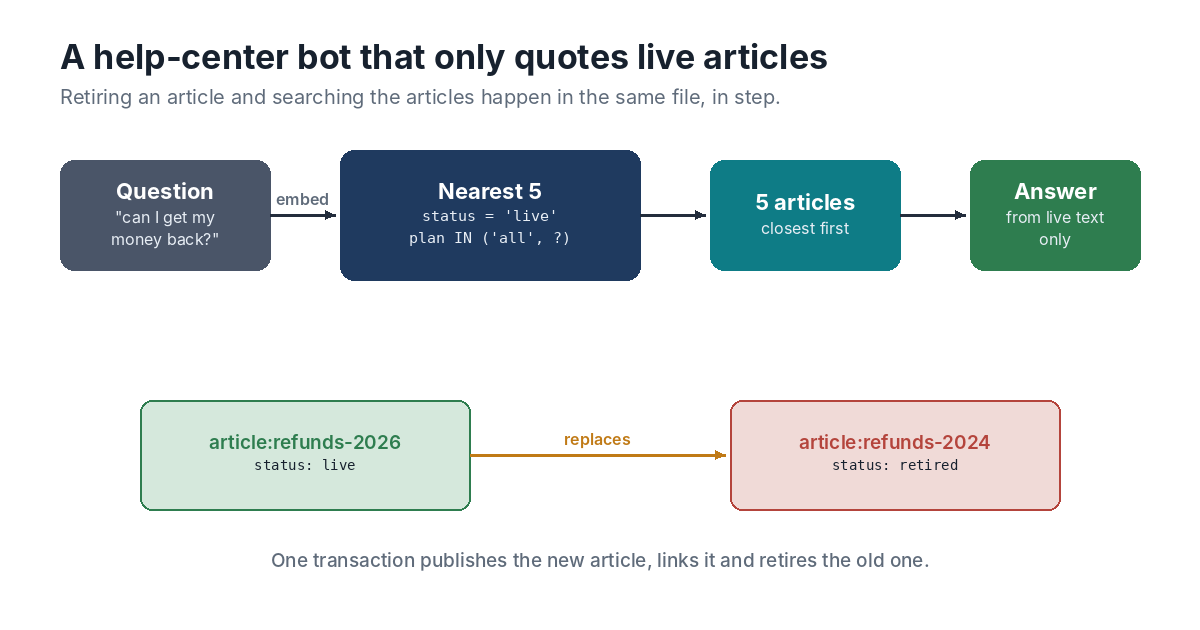
The Article and Its Vector Share a Row
In HyperCrux each article is one record holding its title, its text, the plan it’s for, a status and a vector, all in one row of an SQLite table. Publishing a replacement is a single transaction. The new article goes in with a replaces link pointing from it to the old one, and the old one is marked retired:
err := db.Update(func(tx *hypercrux.Tx) error {
	if err := tx.Put("article:refunds-2026", hypercrux.Fields{
		"title":  "Refunds and credits",
		"body":   text,
		"plan":   "all",
		"status": "live",
		"vec":    embed(text),
	}); err != nil {
		return err
	}
	if err := tx.Link("article:refunds-2026", "replaces", "article:refunds-2024"); err != nil {
		return err
	}
	return tx.Put("article:refunds-2024", hypercrux.Fields{"status": "retired"})
})
embed stands for your embedding model. If any step fails, the whole transaction rolls back, so there’s never a moment when the new article is live and the old one is still live beside it.
Search Only What the Customer Can See
The bot asks for the five closest articles, with an SQL filter on the same row:
hits, err := db.Nearest("article", embed(question), 5,
	"status = 'live' AND plan IN ('all', ?)", customerPlan)
A retired article can’t come back, because its status sits right next to its vector. A customer on the basic plan gets articles marked for everyone or for basic, and nothing else. HyperCrux compares the question with every article that passes the filter, so a strict filter can’t make it miss a closer match. Approximate indexes can lose results that way when a filter rules out most of the data.
Old Links Still Lead Somewhere
Customers bookmark articles, and old chats link to them. When someone opens the retired refunds article, the help centre can follow the replaces links backwards to see what took its place:
steps, err := db.Walk("article:refunds-2024", hypercrux.In, "replaces", 5)
That returns the article that replaced it, then the one that replaced that, up to five steps, nearest first. The last step is the current version, so the page can say the article has been updated and link straight to it.
What HyperCrux Doesn’t Do for You
HyperCrux stores vectors and finds them. It doesn’t make them, and it can’t tell when a vector stops matching its text. When an article is edited, put the new text and the new vector in the same call so they change together. The help centre’s editor doesn’t have to be written in Go, either. The rules live in the file as SQLite triggers, so a PHP or Python editor that writes plain SQL gets the same treatment, and a row it deletes loses its links in the same transaction.
Speed won’t be what holds this back. In the recorded benchmarks on a two-core cloud machine, a search among 1,000 vectors of 384 values took about 4 milliseconds, and this help centre has fewer than half that many articles.
One Write to Retire an Article
Both the search and the help centre work fine on their own. The trouble comes from copying data between them, and from the day the copying quietly stops. With the status and the vector in the same row there’s nothing to copy, so retiring an article is one write, and the bot sees it on the very next question.
The reference lists every call used here, and the quick start gets a file like this running in a few minutes.