A Law Firm's Clause Library That Stays in the Office: Similar Clauses, Precedents and Client Links
Consider a commercial law firm of twenty lawyers. Over the years it has worked on thousands of contracts, and somewhere among them is the best indemnity clause it ever negotiated for a food distributor. A lawyer drafting a new one wants to find it, along with a few others like it under English law, and to know which of the firm’s templates each one started from.
The obvious tool would be a search service with AI built in, and that’s where the firm stops. Client contracts are confidential, and the partners won’t send their text to a cloud service to be indexed, however good the terms look. Whatever they use has to keep everything, embeddings included, on the firm’s own machines.
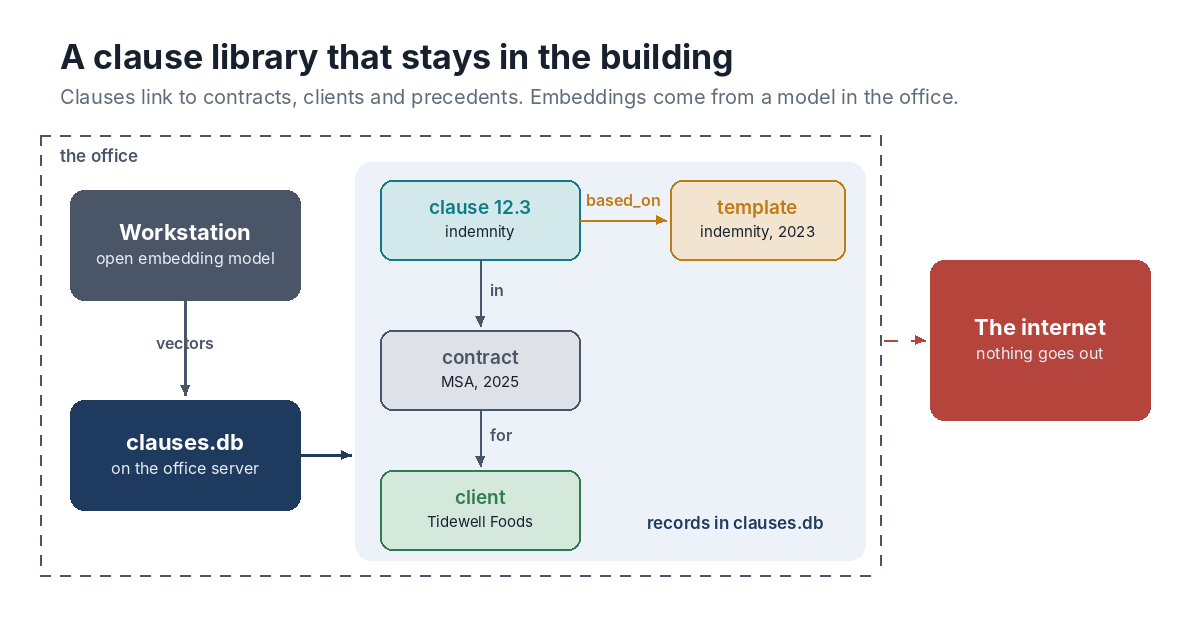
Inside the Building
The library is one HyperCrux file on the office server. An open embedding model runs on a workstation in the office, so no text leaves the building on its way to becoming a vector. Each clause is a record with its kind, the governing law, its text and its vector. Contracts and clients are records too, and links say how they connect: a clause is in a contract and based_on the template it came from, and a contract is for a client.
Lawyers don’t open the file over a shared drive. SQLite’s locking isn’t reliable across network shares, so a small search page on the server opens the file and lawyers use that page from their browsers. The commands below are what the page runs.
Similar Clauses, Filtered the Way a Lawyer Would
hypercrux nearest clauses.db clause "$(embed indemnity for a food distributor)" -k 10 --where "kind = 'indemnity' AND law = 'England and Wales'"
embed stands for the office model, wrapped in a small command that prints a JSON array. The filter is SQL on the same row as the vector, and the search compares every clause that passes it, so a narrow filter can’t hide a closer match. Ten candidates come back, closest first.
Where a Clause Came From
Each clause points to its template with a based_on link, and templates can be based on older templates. A walk follows the chain:
hypercrux walk clauses.db clause:2025-tidewell-msa-12.3 5 --type based_on
1 clause:2023-template-indemnity
That tells the lawyer whether a clause is the firm’s standard wording or something negotiated away from it, and since the template is a clause too, the two can be compared side by side.
Everything Agreed With One Client
hypercrux sql clauses.db "SELECT c.key, c.kind FROM json_each(walk('client:tidewell-foods', 2, NULL, 'in')) w JOIN clause c ON c.key = w.value ORDER BY c.kind"
The walk goes from the client back through its contracts to their clauses, and the query lists them by kind. When Tidewell asks what liability cap it agreed to last time, the answer is one query away.
Practical Notes
At a few thousand clauses, exact search is quick. In the recorded benchmarks on a two-core cloud machine, a search among 10,000 vectors of 384 values took about 42 milliseconds. Some models make longer vectors, and 10,000 vectors of 1,536 values took about 0.12 seconds, which is still fine for a search page.
Backups are easy because the library is a single file. Copy it with VACUUM INTO 'backup.db' through hypercrux sql, which writes a consistent copy even while the search page is using the file.
The search finds candidates, and a lawyer still reads every one. What it saves is the hour spent trying to remember which matter had the clause worth reusing.
Keeping Confidential Work Local
Confidential work often ends up with weaker tools, because the good ones run in someone else’s cloud. A file on the office server with a model beside it gives the firm search by meaning and links between its contracts, with plain SQL over both, while the contracts stay where they’ve always been. The quick start has the commands, and the download page has the binaries.